
I used it well in Hong Kong~~ I had no major issues and the customer service responses were quick, so I was very satisfied~~~^^^
香港 eSIM HKT 5G デイリー
Hongkong Hkt 5g Daily
$1.031.03 usd
香港 eSIM HKT 5G デイリー — $1.03 (1.03 USD) — In stock
In stock
香港 eSIM HKT 5G デイリー
Hongkong Hkt 5g Daily
$1.031.03 usd
香港 eSIM HKT 5G デイリー — $1.03 (1.03 USD) — In stock
In stock
当社製品が使う現地回線
すべての渡航先の現地キャリア


データ量と日数を選択してください。価格はeSIM1枚あたりで、旅行者ごとに1枚必要です。
必要なデータ量と日数を選んで購入。eSIMのQRコードはデジタルで届きます。
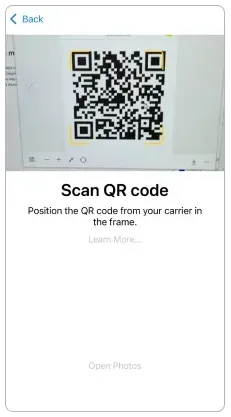
Wi-Fi環境で端末の設定からQRコードを読み取ります。到着するまでデータローミングはオフのままにしてください。
到着したらモバイルデータをeSIMに切り替え、データローミングをオンにします。ほとんどのプランはこの時点から日数を数えます。
*Scanning the eSIM QR code provided in the email in advance will not activate it. *Activation begins only after you arrive in a supported country and enable the registered eSIM.
速度と使用量、AIプラン案内、家計簿、AIレンズ、チャット。
サポートは週7日です。セルフチェックのあと、無料のバックアップeSIMをお送りします。
ダウンロード、ビデオ通話、ストリーミングを5Gで。
MaaltalkNowアプリからどこへでもかけられます。
ノートPC、タブレット、同行者と接続を共有できます。
短い旅や日程変更に合う1日ごとの容量です。
eSIMのQRはメールで届きます。配送も店舗SIMも不要です。
ベストセラー
プリペイド旅行eSIMでHong Kongでもつながる — 物理SIMもローミング料金も不要。
 HKT
Maaltalk Hong Kong eSIMのプラン仕様にもとづく回答です。
プラン情報の最終更新
Maaltalk Hong Kong eSIMはHong Kongでモバイルデータ通信を提供します。
提携ネットワーク:CSL。
Maaltalk Hong Kong eSIMは最大5Gの速度で接続します。
ローミング提携:CSL。
テザリング(ホットスポット)に対応しています。
Maaltalk Hong Kong eSIMは日額プランで、毎日新しい高速データ容量が付与されます。
1日のデータ量は00:00(香港時間)にリセットされます。
高速データ使い切り後:128Kbps 無制限。
1日分のデータを使い切ると、速度は128kbpsまで下がります。この速度でできるのはWhatsAppなどのメッセンジャーでのテキスト送信だけで、それ以外のサービスは使えません。ご安心ください。翌日にはリセットされ、通常の速度で再びご利用いただけます。
旅行ガイド

If you're planning a trip across Asia this year, finding the best eSIM for Asia should be at the top of your travel checklist. While Asia is one of the most digitally connected regions in the world, international roaming charges can still be shockingly expensive - sometimes exceeding $10 - 15 per da

If you’ve ever landed in a new country, turned on your phone, and realized your mobile data won’t connect, you’re not alone. One of the most common causes of this frustrating issue - especially when traveling or switching SIMs/eSIMs - is incorrect APN settings.
いいえ。Maaltalk Hong Kong eSIMはデータ専用です。通話とSMSは普段のSIMをオンにしたまま使うか、WhatsAppやFaceTimeなどのアプリをご利用ください。
*Scanning the eSIM QR code provided in the email in advance will not activate it.
*Activation begins only after you arrive in a supported country and enable the registered eSIM.
有効期間の最終日00:00(香港時間)に終了します。
1) このページでプランを選んで購入すると、eSIMのQRコードがメールで届きます。2) 出発前にWi-Fi環境でインストールします:iPhoneは設定 > モバイル通信 > eSIMを追加、Androidは設定 > 接続 > SIMマネージャー > eSIMを追加。3) 到着後、eSIM回線とデータローミングをオンにします。
*Before departure, scan the QR code included in the activation email to install the eSIM.
*After arriving at your destination, change the settings on your phone to start using the eSIM.
*The validity period begins when the eSIM connects to the local network after arrival.
データがつながらない場合はAPNを手動で設定してください:
CTExcel。
60つのプランがあり、eSIM 1つあたり$1.03〜$20.30で、継続課金はありません。
SIMロック解除済みでeSIM対応の端末が必要です。電話アプリで*#06#を入力し、EID(32桁の番号)が表示されればeSIM対応です。このページの「eSIM対応端末を確認」で機種を検索することもできます。中国本土・香港・マカオで販売されたiPhoneはeSIMに対応していません。
再インストール:削除後、最大5回まで再インストールできます。。
携帯電話にeSIMを登録していなければ返金できます。
はい。普段のSIMは端末に入れたまま番号も維持され、旅行用eSIMは2回線目として追加されます。
eSIMに割り当てられた番号の確認方法:このプランはデータ専用で、現地の電話番号は含まれません。。
残りデータの確認方法:残データは設定 → モバイル通信のeSIM回線で確認してください。通信事業者ポータルは注文メールを添えてサポートへお問い合わせください。。
WhatsAppに分単位の通話料はありません。必要なのはデータ通信だけで、このプランがそのデータです。
あわせて読む: eSIMと物理SIMEIDの確認SM-DPアドレスAPN設定
レビュー
Maaltalkのレビューをまとめて表示します。同じeSIMを販売している各販売チャネルの購入確認済みeSIMレビューと、App Store・Google PlayのMaaltalkNowアプリレビューです。日本語以外は機械翻訳、すべての評価を表示しています。
このサイトで購入しましたか?注文番号でレビューを書けます。
MaaltalkNowアプリ
10%割引が自動で適用されます。
I used the Maaltalk SIM again this time and it worked great! 👍👍
I had a great trip to Japan with Maaltalk eSIM.
I purchased the Maaltalk eSIM while preparing for my trip to Matsuyama, Japan! I chose the unlimited plan on the local SoftBank network in Japan, and I was really satisfied. Throughout my trip, the data connection was strong and uninterrupted, allowing me to search maps, find great restaurants, and send photos without any hassle. Having internet access is crucial when traveling abroad, and being able to use it without worrying about data allowed me to focus entirely on my trip without any distractions. It was also really convenient to use the eSIM without needing to swap out a physical SIM card. The price was reasonable, and my satisfaction with the service was high, so I definitely want to use Maaltalk for my next trip to Japan! I look forward to more great products and various benefits in the future.
It's worth the price. The data works better than other eSIMs.
I went to Osaka from November 12th to 15th. Since I had a great experience with Maaltalk SIM during my trip to Fukuoka last year, I bought it again for this trip without any hesitation. 3GB a day was enough for me, but I wondered if it was a bit too little for my middle schooler who was gaming throughout the trip. However, I thought it was better not to give more data. Since it was a free trip, I used maps to find transportation, looked for restaurants, made payments, and didn’t use Wi-Fi at the accommodation, but I was able to use it seamlessly from 6 AM to around midnight every day. Next year, I’m planning to go to China, and I’ll definitely be using Maaltalk again!
I'm generally satisfied with the speed and capacity.
I used it well in Fukuoka. The data worked great, and I had no problems at all~~
The data speed and capacity are great!
対応: iPhone 18 · Galaxy S26 · Pixel 10
プランはいつ開始されますか?
Scanning the eSIM QR code provided in the email in advance will not activate it.
Activation begins only after you arrive in a supported country and enable the registered eSIM.
有効期間の最終日00:00(香港時間)に終了します。
No Real-Name Registration: This product can be used without real-name registration.
Now you can access ChatGPT in Hong kong via MalTalkNow's TripTalk .
Experience cutting-edge AI conversations anytime, anywhere!
返金
携帯電話にeSIMを登録していなければ返金できます。
開通・ご利用方法
CTExcel
通話・SMS・備考