
I used it well in Hong Kong~~ I had no major issues and the customer service responses were quick, so I was very satisfied~~~^^^
Philippines Unlimited 5G Fixed
$7.997.99 usd
Philippines Unlimited 5G Fixed — $7.99 (7.99 USD) — In stock
In stock
Philippines Unlimited 5G Fixed
$7.997.99 usd
Philippines Unlimited 5G Fixed — $7.99 (7.99 USD) — In stock
In stock
Local networks our products use
Local carriers in every destination


Pick your data and days. Prices are per eSIM — one for each traveler.
Pick the data and days you need and check out. Your eSIM QR code is delivered digitally.
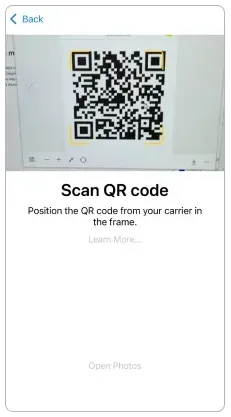
Scan the QR code in your phone settings on Wi-Fi. Leave data roaming off until you arrive.
On arrival, switch mobile data to the eSIM and turn on data roaming. Most plans start counting days then.
*Scanning the eSIM QR code provided in the email in advance will not activate it. *Activation begins only after you arrive in a supported country and enable the registered eSIM.
Speed and usage, an AI plan guide, expense log, AI Lens, and chat.
Support is available every day. Complete the self-check and we issue a free backup eSIM.
Downloads, video calls, and streaming on a 5G network.
Call anywhere with the MaaltalkNow app.
Share the connection with a laptop, tablet, or a travel companion.
Daily allowances that fit a short trip or a change of dates.
The eSIM QR arrives by email. No shipping, no plastic SIM to pick up.
Fast
Stay connected in Philippines with a prepaid travel eSIM — no plastic SIM, no roaming bills.

Unlimited data
FUP (Fair Usage Policy): Unlimited high-speed data, followed by unlimited data at up to 5 Mbps.
Answers taken from the plan specifications of the Maaltalk Philippines eSIM.
Plan information last updated
The Maaltalk Philippines eSIM provides mobile data in Philippines.
Partner networks: Telkomsel.
The Maaltalk Philippines eSIM connects at up to 5G speeds.
Roaming partners: Telkomsel.
Hotspot / tethering is supported.
The Maaltalk Philippines eSIM is a fixed data plan: one data allowance to use anytime within the validity period.
After the high-speed allowance is used up: 5Mbps Unlimited.
According to the Fair Usage Policy (FUP), up to 10GB of high-speed data is available per day.
Once the daily 10GB high-speed data allowance is used up, you can continue enjoying unlimited data at a reduced speed of up to 5Mbps.
No. The Maaltalk Philippines eSIM is data-only. Keep your regular SIM on for calls and texts, or call over apps such as WhatsApp or FaceTime.
*Scanning the eSIM QR code provided in the email in advance will not activate it.
*Activation begins only after you arrive in a supported country and enable the registered eSIM.
A day (24 hours) is deducted based on the activation start time.
1) Choose a plan on this page and check out — the eSIM QR code is delivered by email.
2) Install it on Wi-Fi before you travel: iPhone Settings > Cellular > Add eSIM, or Android Settings > Connections > SIM manager > Add eSIM.
3) On arrival, turn on the eSIM line and data roaming.
*Before departure, scan the QR code included in the activation email to install the eSIM.
*After arriving at your destination, change the settings on your phone to start using the eSIM.
*The validity period begins when the eSIM connects to the local network after arrival.
If data does not connect, set the APN manually:
e-ideas.
There are 13 plans, priced from $7.99 to $36.45 per eSIM, with no recurring fees.
Your phone must be carrier-unlocked and support eSIM. Dial *#06# in the Phone app: if an EID (32-digit number) appears, the phone supports eSIM. You can also look up your model with “Check eSIM compatibility” on this page. iPhones sold in mainland China, Hong Kong and Macao do not support eSIM.
Reinstallation: Reinstall is not available..
Refunds are available if you do not register the eSIM to your cellular phone.
Yes. Your main SIM stays in the phone and keeps your number; the travel eSIM is added as a second line.
To find the number assigned to the eSIM: This plan is data only and does not include a local phone number..
To check remaining data: Check remaining data under Settings → Mobile/Cellular Data for the eSIM line. For carrier portals, contact support with your order email..
WhatsApp does not charge per minute. You only need data — that is what this plan is for.
Reviews
Every Maaltalk review in one place: verified-purchase eSIM reviews from the sales channels that sell these same eSIMs and MaaltalkNow app reviews from the App Store and Google Play. Non-English reviews are machine-translated; every rating is shown.
Bought from this store? Write a review with your order number.
I used the Maaltalk SIM again this time and it worked great! 👍👍
I had a great trip to Japan with Maaltalk eSIM.
I purchased the Maaltalk eSIM while preparing for my trip to Matsuyama, Japan! I chose the unlimited plan on the local SoftBank network in Japan, and I was really satisfied. Throughout my trip, the data connection was strong and uninterrupted, allowing me to search maps, find great restaurants, and send photos without any hassle. Having internet access is crucial when traveling abroad, and being able to use it without worrying about data allowed me to focus entirely on my trip without any distractions. It was also really convenient to use the eSIM without needing to swap out a physical SIM card. The price was reasonable, and my satisfaction with the service was high, so I definitely want to use Maaltalk for my next trip to Japan! I look forward to more great products and various benefits in the future.
It's worth the price. The data works better than other eSIMs.
I went to Osaka from November 12th to 15th. Since I had a great experience with Maaltalk SIM during my trip to Fukuoka last year, I bought it again for this trip without any hesitation. 3GB a day was enough for me, but I wondered if it was a bit too little for my middle schooler who was gaming throughout the trip. However, I thought it was better not to give more data. Since it was a free trip, I used maps to find transportation, looked for restaurants, made payments, and didn’t use Wi-Fi at the accommodation, but I was able to use it seamlessly from 6 AM to around midnight every day. Next year, I’m planning to go to China, and I’ll definitely be using Maaltalk again!
I'm generally satisfied with the speed and capacity.
I used it well in Fukuoka. The data worked great, and I had no problems at all~~
The data speed and capacity are great!
Travel guides

If you're planning a trip across Asia this year, finding the best eSIM for Asia should be at the top of your travel checklist. While Asia is one of the most digitally connected regions in the world, international roaming charges can still be shockingly expensive - sometimes exceeding $10 - 15 per da

If you’ve ever landed in a new country, turned on your phone, and realized your mobile data won’t connect, you’re not alone. One of the most common causes of this frustrating issue - especially when traveling or switching SIMs/eSIMs - is incorrect APN settings.
MaaltalkNow app
Your 10% discount is auto-applied.
Also in the app
Includes iPhone 18 · Galaxy S26 · Pixel 10
When does my plan start?
Scanning the eSIM QR code provided in the email in advance will not activate it.
Activation begins only after you arrive in a supported country and enable the registered eSIM.
A day (24 hours) is deducted based on the activation start time.
Need more data later?
In-place top-up of an existing eSIM is not offered. Buy a new eSIM — it is issued separately and does not add data to a profile you already have.
Buy a new eSIMDaily plan is allows you to adjust the desired dates and data to suit your travel itinerary.
If you use up the data allocated each day, the speed will decrease and new data will be recharged the next day.
It is recommended for use by those who have a clear understanding of their travel period and data usage.
Without complicated procedures, the QR code and usage instructions will be sent to your email immediately after purchase.
Refund
Refunds are available if you do not register the eSIM to your cellular phone.
Activation & usage
e-ideas
Calls, texts & notes